AI PDF Catalog Generator

Turn product photos into a professional PDF catalog , powered by AI

Upload product images and Katapic's AI writes titles, SEO-and-AEO-optimized descriptions and prices, then lays everything out in one of thirty designed templates: real covers, a table of contents, category dividers and a back cover with your contacts. Ready to share with buyers and wholesalers.
Why product catalog PDFs kill your weekend

Designing a PDF catalog by hand means hours in Canva or InDesign, rewriting every description, begging someone to shoot photos, and repeating the whole thing whenever you add new products. Meanwhile your competitors already sent theirs.

Slow manual layout

Two full days to format 50 products in any design tool.

Blank-page syndrome

Writing catchy titles and specs for every single SKU drains you.

Outdated files

The catalog you send today is obsolete next week, but redoing it is unthinkable.

One upload. A full PDF catalog. Generated by AI.

Katapic is the AI-powered product catalog PDF generator that does the whole job: it reads your photos, writes the copy, and lays the catalogue out in one of thirty designed templates with a real document structure. You get a catalog worth paying a designer for, in minutes.

  • Thirty designed templates: covers, font pairings and page styles that actually differ
  • Table of contents with page numbers, category dividers and a back cover
  • AI-written titles, descriptions and specs in 10 languages
  • Portrait or landscape, your logo and brand colors on every page
  • Free export, and the PDF matches the on screen preview exactly

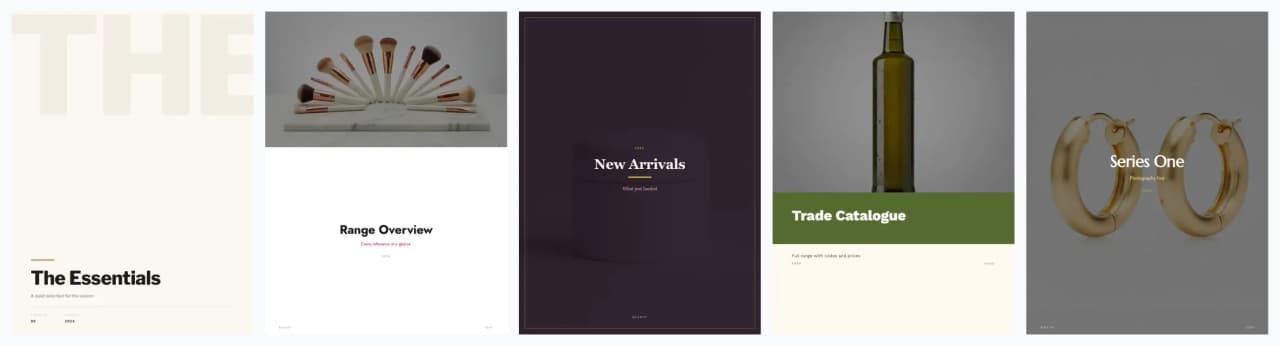
Templates that actually look different

A few of the thirty covers, rendered by the real engine from demo products.

Five PDF catalog covers produced by Katapic templates, each with a different layout, palette and typography

How the AI PDF catalog generator works

1

Upload product photos

Drag and drop images from your phone or computer, or pull products straight from your WooCommerce store.

2

The AI writes each listing

For every product: title, SEO-and-AEO description in up to 10 languages, category, search keywords, and tech specs.

3

Pick a designed template

Thirty templates, each with its own cover, font pairing, page style and orientation. Add your logo and colors once and every page follows.

4

Structure and export the PDF

Turn on the table of contents, category dividers and a back cover with your contacts, then export a print quality PDF that matches the preview page by page.

Who's using it to ship catalogs faster

Vinted sellers with 100+ items

Turn a thrift haul into a shareable lookbook PDF so resellers and buyers can see the full collection at a glance.

Read the Vinted selling guide

WooCommerce stores

Sync your WooCommerce catalog both ways, score every product for SEO and AI-search visibility, then generate a seasonal PDF for email campaigns and wholesale, without touching InDesign. (Shopify on the roadmap.)

See how the WooCommerce sync works

Independent makers and brands

Artisans, ceramicists, jewelers: a press-ready PDF catalog that makes tiny brands look professional.

See pricing plans

Wholesalers and distributors

Send a branded PDF to retailers with current availability, and regenerate whenever stock changes.

The tangible wins

Minutes per catalog, not days

Pick the products, pick a template, export. The layout, the table of contents and the back cover are built for you.

10x faster catalog assembly

50 products in a PDF in under an hour, start to finish.

10 languages, zero translator

SEO-friendly descriptions in every language your buyers speak.

Brand consistency, always

Fonts, colors, and layout stay on-brand on every page.

Frequently asked questions

Do I need a designer to use the AI PDF catalog generator?+

No. Katapic picks layouts, fonts, and colors based on your brand palette. You upload a logo once and the AI applies it everywhere.

How does the PDF catalog fit with my online store?+

The catalog is built from the same optimized product descriptions Katapic writes for your store, so the copy that ranks in search and gets quoted by AI assistants is the copy buyers read in your PDF. One shareable, downloadable document: professional on any device, valid for months, and ready to email to buyers.

Can I edit what the AI writes?+

Yes. Every AI-generated title and description is editable. Approve, tweak, or regenerate individual items.

Will the PDF be print-ready?+

Yes. Katapic renders the PDF server side at print quality, portrait or landscape, ready to print or to share digitally.

How many products can one PDF catalog contain?+

Up to 200 products in a single PDF. Exporting is free and uses no credits, and so is saving the catalogue to your library to export it again when your products change.

Does the catalog work with Vinted and WooCommerce?+

Yes. Katapic reuses the same AI product listings across PDF catalogs, Vinted-ready listings, and two-way WooCommerce sync. Shopify support is on the roadmap.

What does the finished catalogue include?+

A designed cover (eight layouts, from full page photography to typographic), an optional table of contents with page numbers, divider pages for each category, product pages with prices and reference numbers, and a back cover with your contact details.

Ready to ship your first AI-generated PDF catalog?

Start with 10 free credits and export as many catalogs as you like: the export never costs a credit. No credit card.